
The complete management of your cooperative – in WordPress.
GenoZentral has long been more than just a member administration: Application for membership and membership area, contributions and SEPA collection, committees, minutes of meetings and draft resolutions, circulars, statutory list of members, association audit and accounting with calculation – the entire cooperative managed from its own, tidy surface.
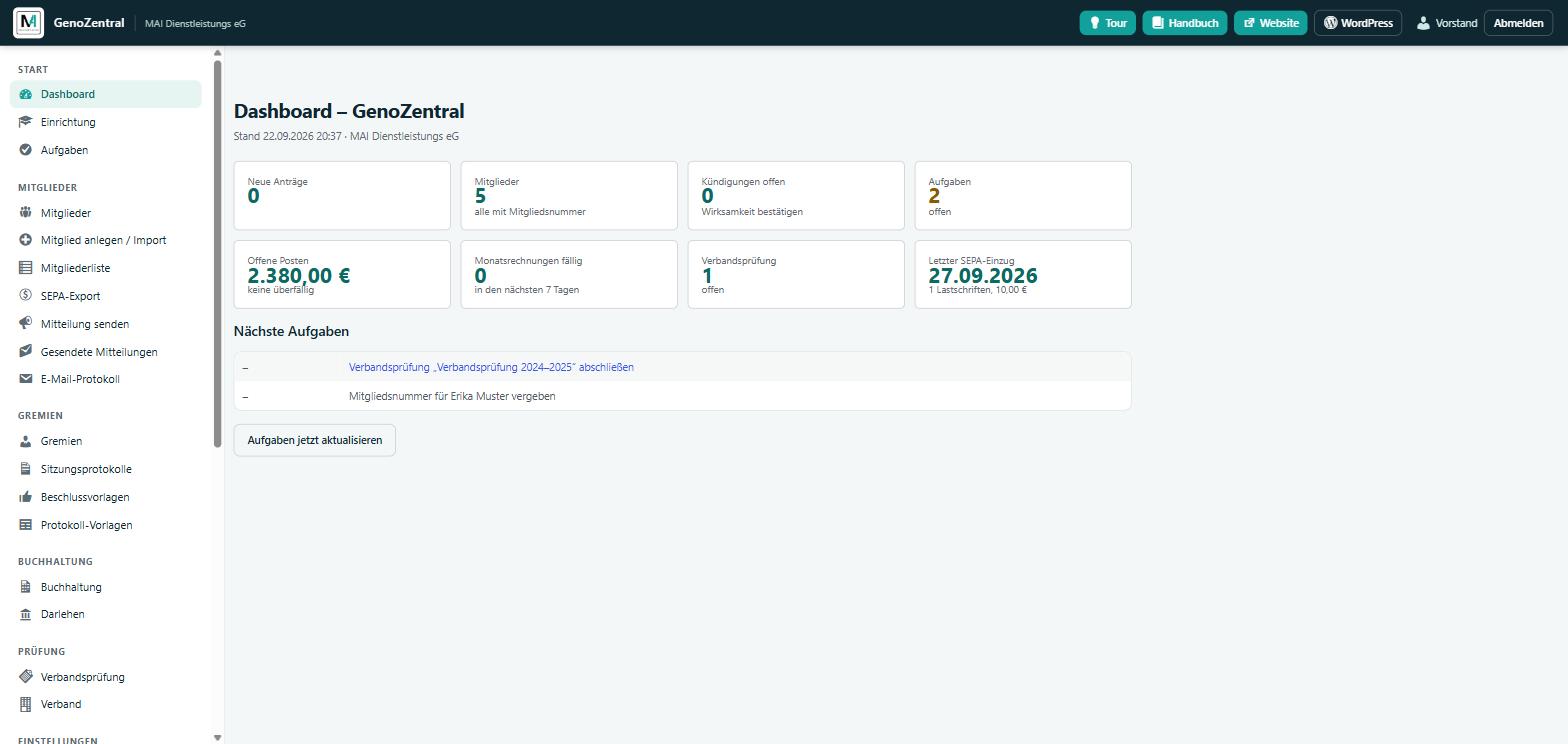
Everything a cooperative needs to manage in its day-to-day life – in one place.
Examination of applications, dismissing mandates, collecting contributions, informing members, recording meetings, documenting decisions and preparing the statutory audit: GenoZentral takes these steps and keeps track of each – the board, supervisory board and office work in the same interface.
Recording in minutes
Interested parties fill out the application on your website, choose their membership type and see their contribution level live. Confirmation, application number and mandate PDF come automatically.
Members help themselves
In the member area (registration with one-time code by e-mail), members change their data and bank details, update the number of employees, request the articles of association or write you a message.
Contributions without manual work
Contribution scale by number of employees or lump sum, SEPA export at the push of a button and automatic recognition if a payment is disrupted.
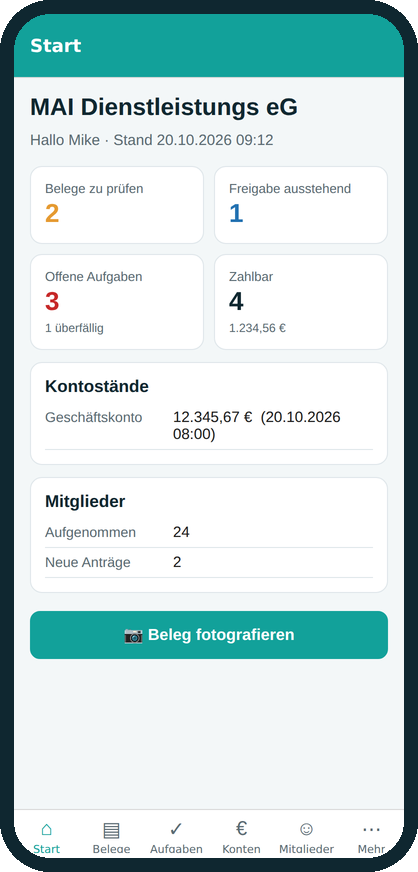
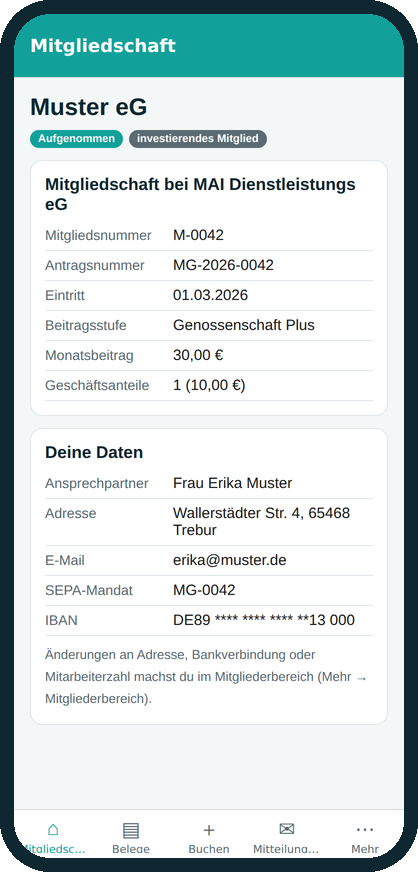
Your cooperative in your pocket. Now on Google Play
Check and share receipts on the go, complete tasks, look up balances and members’ files – and for members: Membership, bookings, invitations with acceptance/cancellation and receipts directly on the smartphone. The app connects to your own GenoZentral installation (from version 3.35) – without a cloud service.
- Board and member role in an app, rights as in the plugin
- Push notifications for new tasks, requests, approvals and invitations
- Now available on Google Play – the iPhone version for the App Store is coming soon
Membership management
Five membership types, one form
Show functionsHide functions
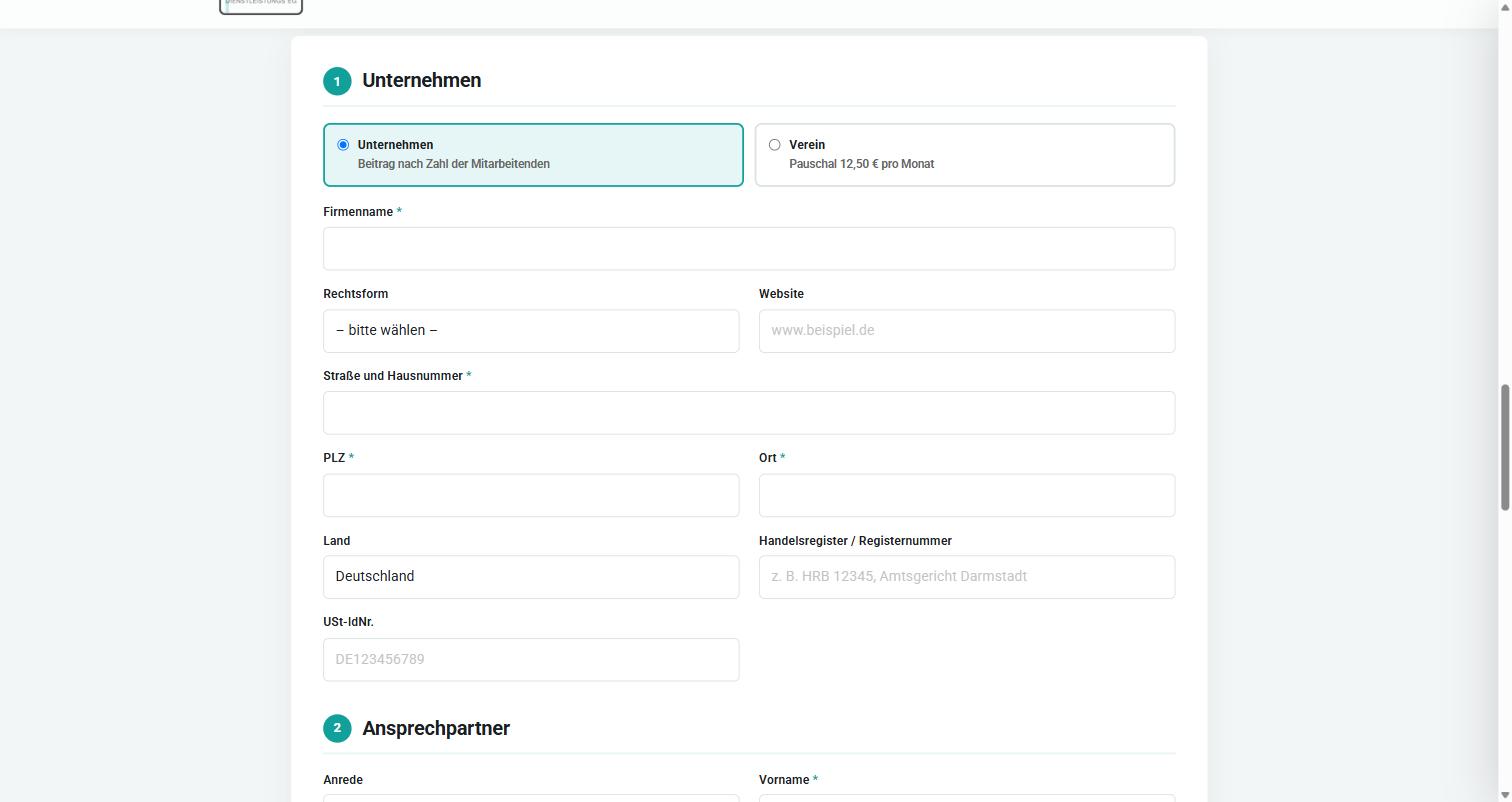
Company, association, cooperative, natural person or reseller – each type with its own contribution rules, can be activated individually. The IBAN is checked when typing, the post appears live.
- Contribution scale freely configurable, including control ID field
- SEPA Basic Direct Debit Mandate with Automatic Mandate Reference
- Spam protection without captcha, no external services
Members area
The Members' Area
Show functionsHide functions
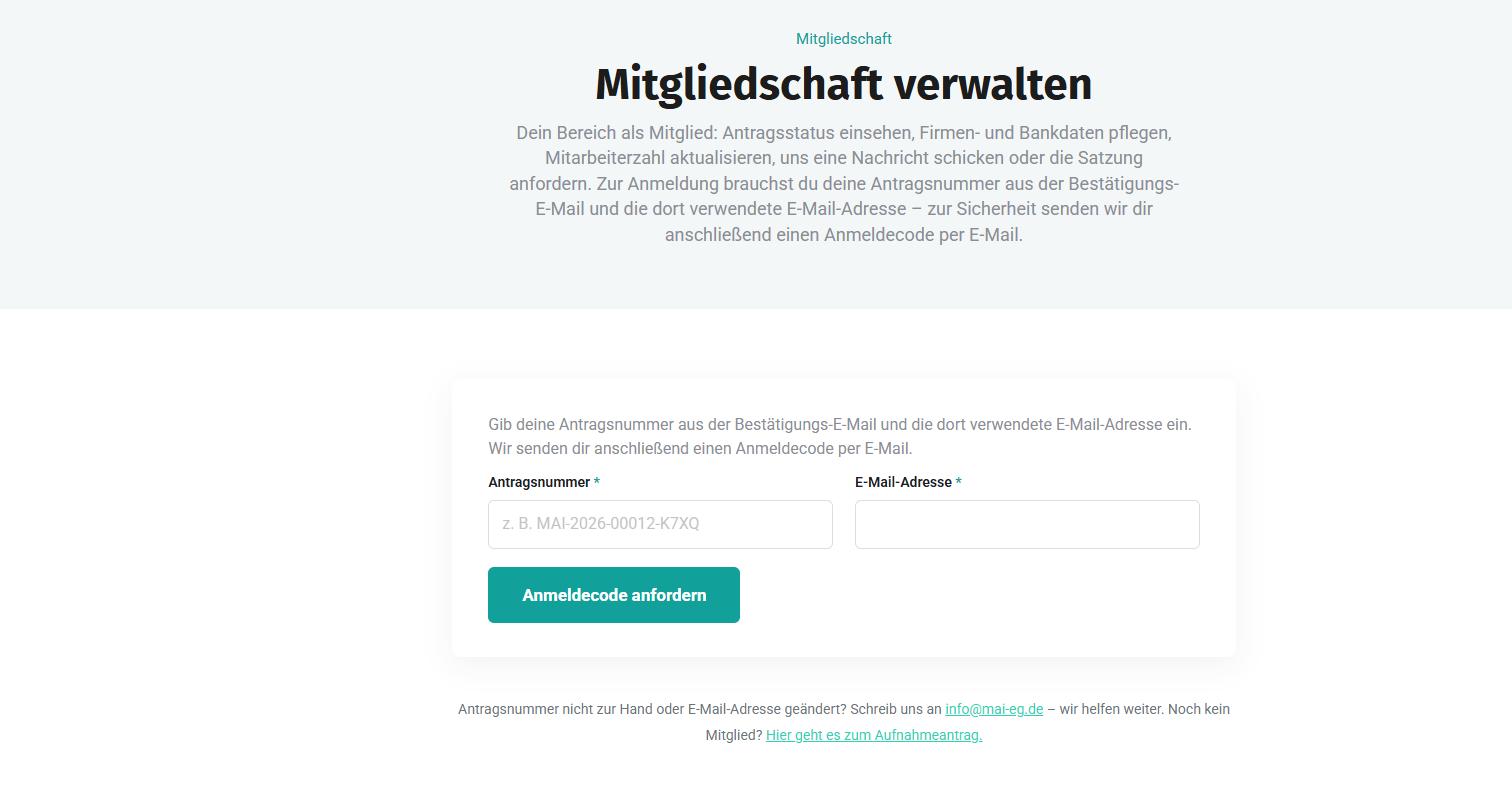
Login with one-time code by email, no password to manage. Members change their data and bank details, update the number of employees, request the articles of association or send you a message – everything ends up directly in the file.
Contributions & SEPA
SEPA collection and payment disruptions
Show functionsHide functions
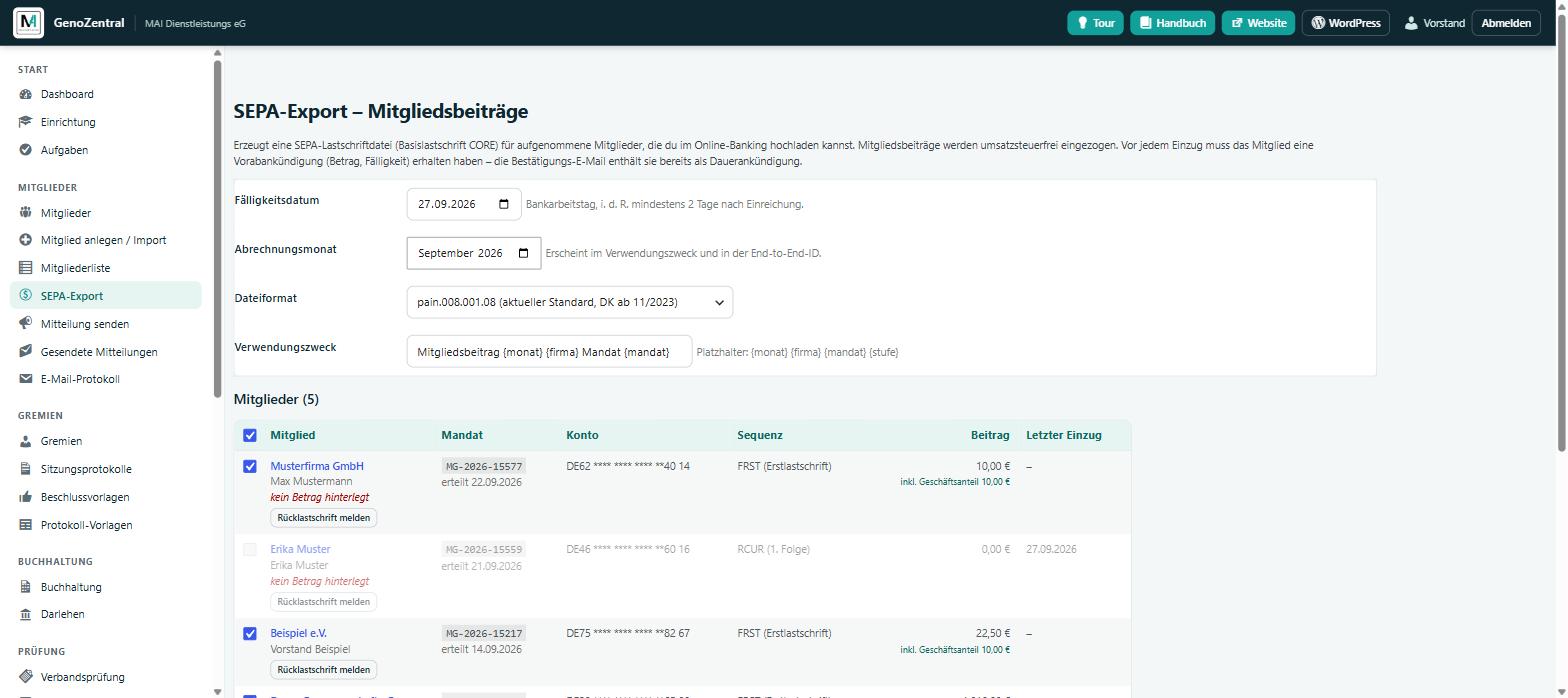
Export posts as SEPA Base Direct Debit - select members, set billing month and file format, done. If a payment is not made, you mark the member as disturbed; after the set deadline, the agreed consequence automatically applies.
Minutes of meetings
Minutes of meetings in minutes
Show functionsHide functions
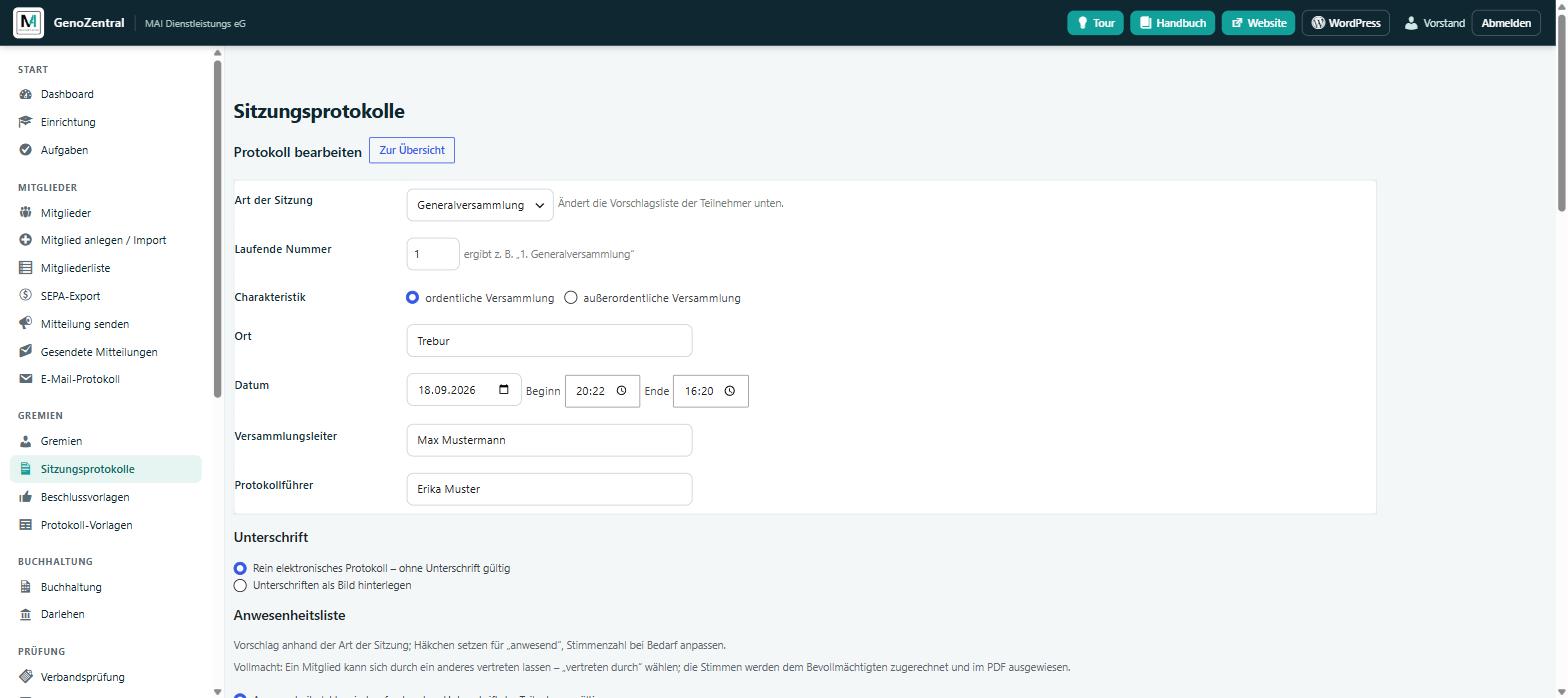
Enter the type, location and date – the attendance list will automatically suggest the appropriate persons with a number of votes. The finished PDF carries your logo and does without empty intermediate pages.
- Selected resolution templates are automatically attached to the PDF as separate sheets
- Shipping directly from the list, with freely selectable recipients
- Exportable as Excel list
- change, complete and move agenda items freely; draft resolutions per item for decision; Free field for special topics
- Own types of meetings for the founding meeting (with Part B) and approval of the annual financial statements with discharge of the Board of Management
- Attach additional documents per protocol
Draft Decisions
Create, select, export decision templates
Show functionsHide functions
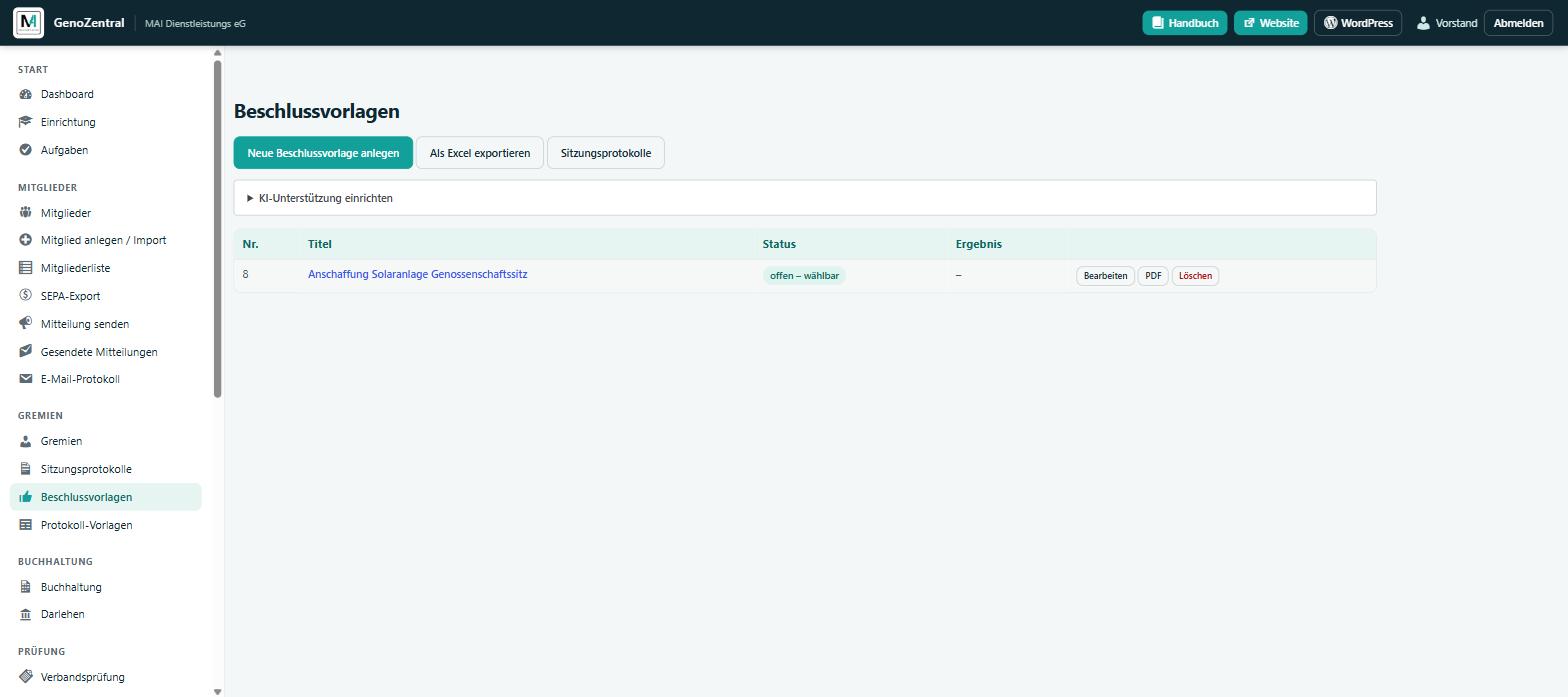
Decision templates are created independently of a meeting – on request with AI support for the first draft. At a general meeting, you simply select them instead of re-typing them; The result is automatically calculated from the votes. Once used, a template is locked for other sessions.
Bodies & Organisational chart
Executive Board, Supervisory Board and Organisation Chart
Show functionsHide functions
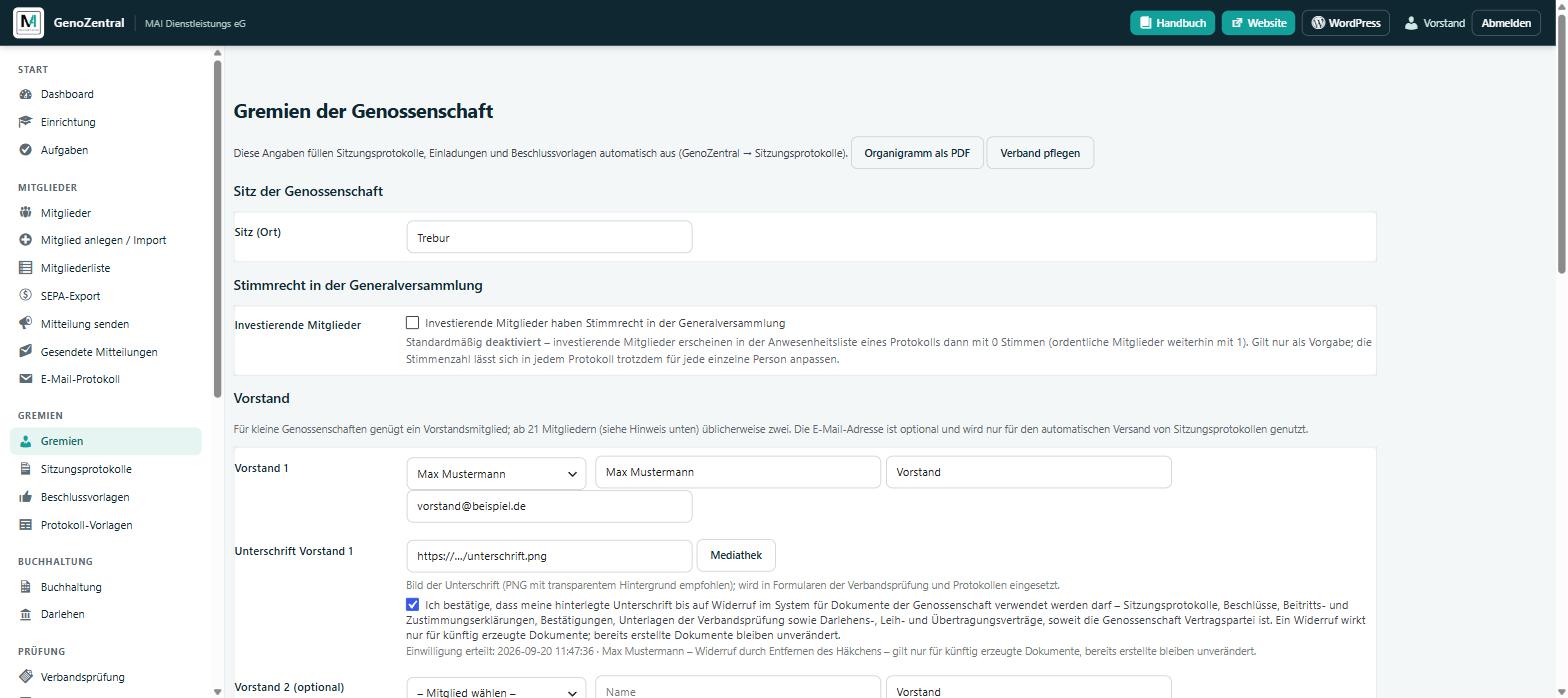
The Executive Board, plenipotentiary of the Annual General Meeting and the Supervisory Board will be deposited once and will automatically fill in each report in the future. At the push of a button, the plugin generates an organizational chart as a PDF with your logo.
Association test
The mandatory examination pursuant to §§ 53 et seq. GenG – prepared with a click
Show functionsHide functions
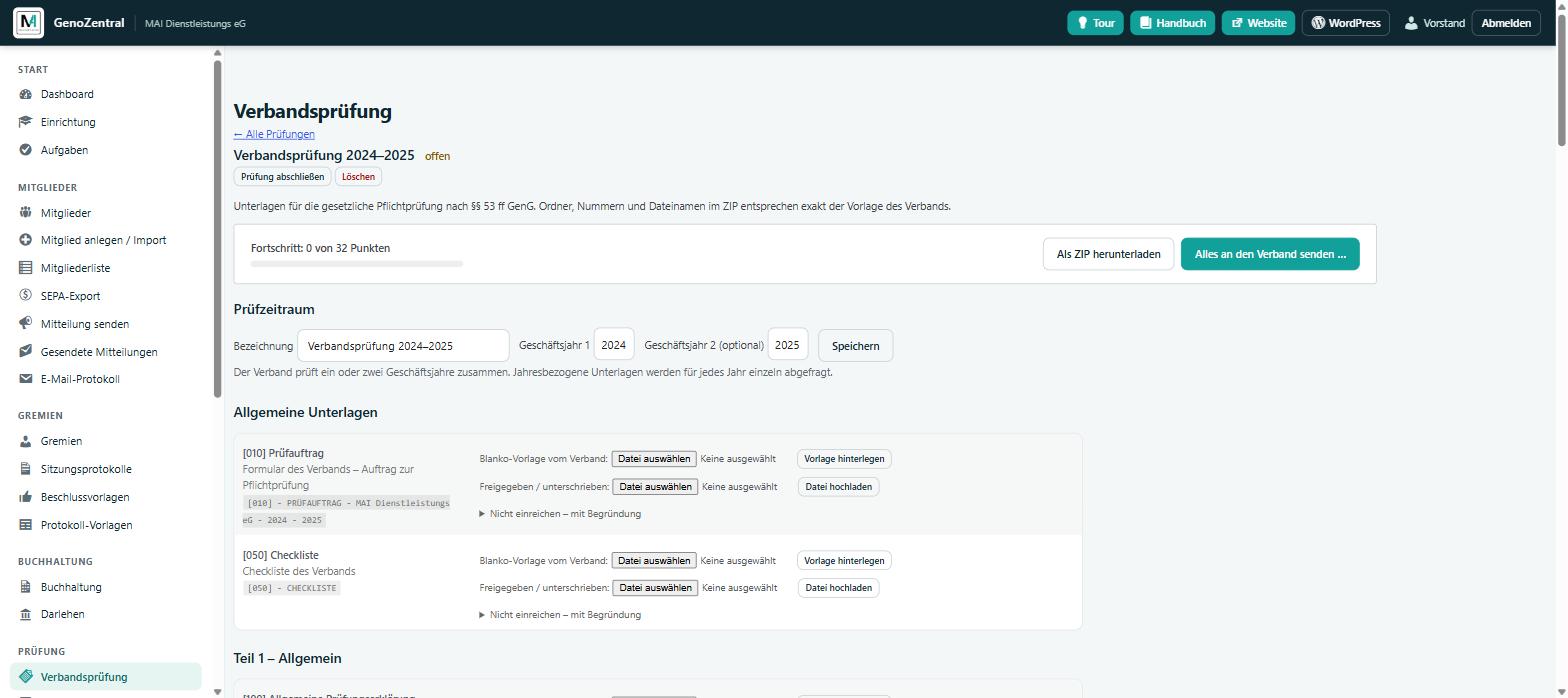
A checklist of all documents, structured like the submission of your examination association. Set an audit period of one or two financial years, upload your own documents, request accounting documents from the tax advisor by collective e-mail. Member lists (current and at the end of each year) are generated by the plugin itself, session logs from the review period are simply checked.
- Fill in the association’s PDF forms directly in the backend – pre-filled with cooperative, committees and audit period
- Each audit as a separate process with progress; non-applicable points with justification, which automatically migrates to the ZIP as an indication for the association
- All as a ZIP in the folder and name structure of the association – after preview by one click by e-mail to the association
Shares & Joining
Share of business and declaration of accession without manual work
Show functionsHide functions
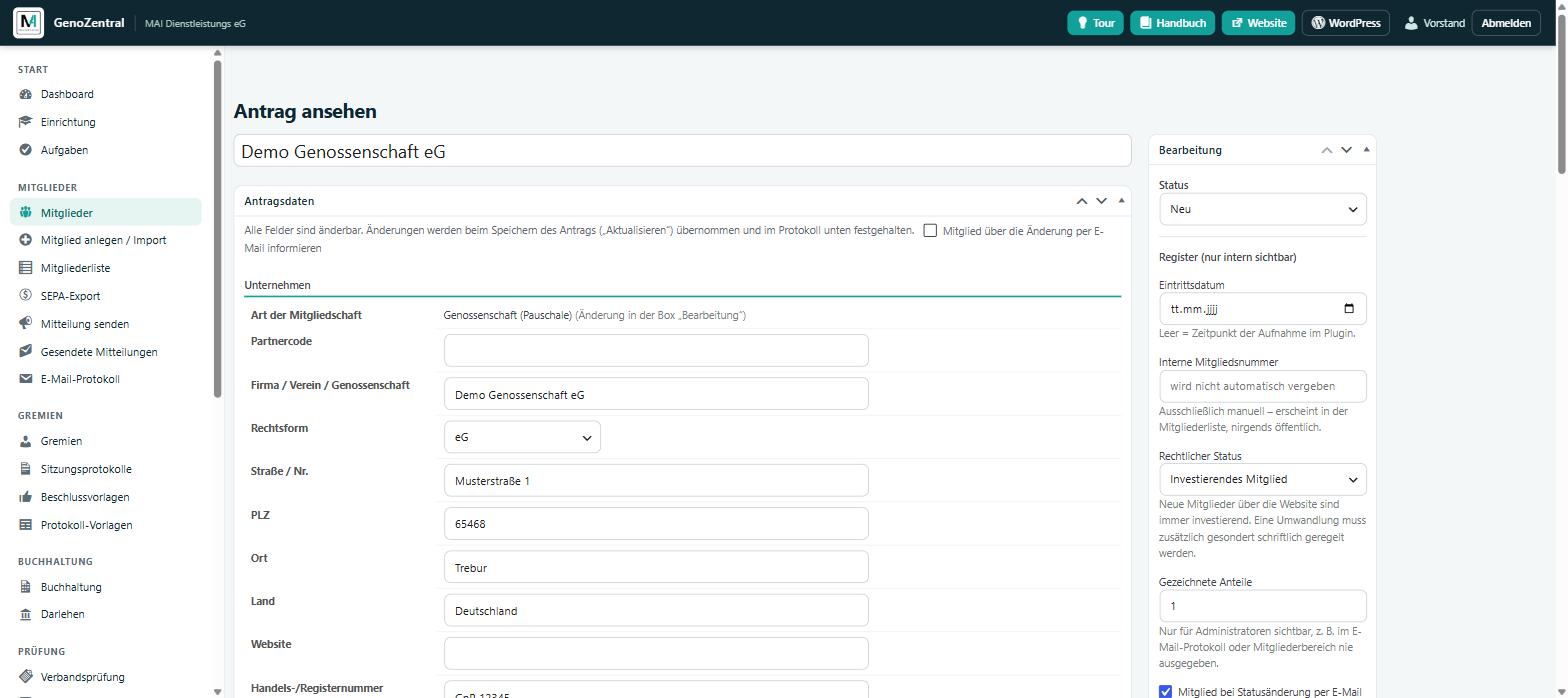
The one-off share is shown in the application, mentioned in the confirmation and in the mandate and automatically collected with the first SEPA collection. From the file, the plugin generates the declaration of accession/participation pursuant to §§ 14, 15a, 15b GenG – filled with all file data, in the structure of the association template.
- Shares, membership number and legal status maintained in the file, each change logged
- Declaration of Accession filed as PDF directly in the file
- Entry and exit dates for existing members – including when importing
Accounting & calculation
Accounting with calculation - directly in the plugin
Show functionsHide functions
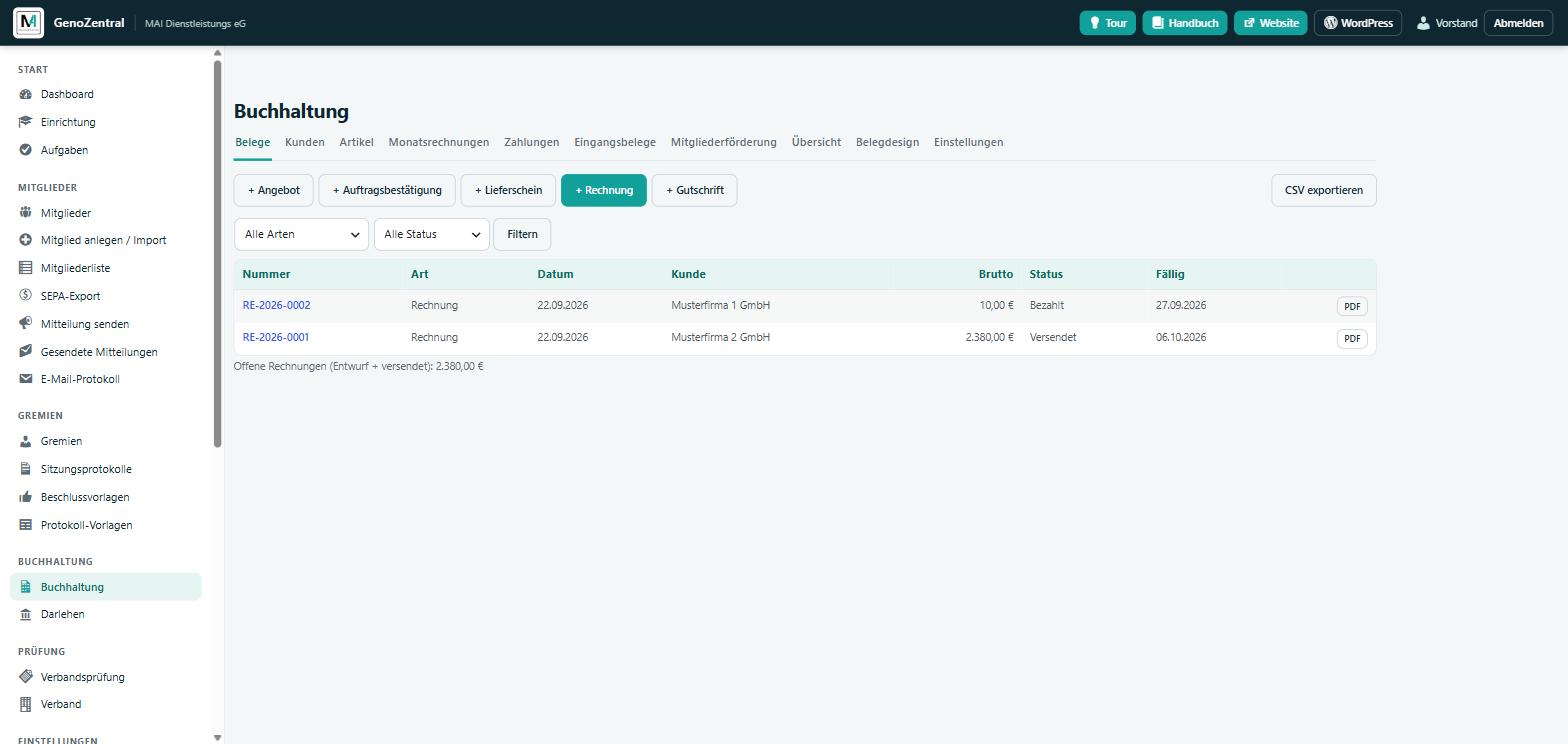
Offers, order confirmations, delivery notes, invoices and credit notes in the design of the cooperative, as a PDF by e-mail to members or free customers. Invoices are issued as ZUGFeRD-PDF/A-3 and XInvoice out – the e-invoicing obligation is thus discharged.
- Contribution invoices are generated automatically with each SEPA collection; Monthly invoices run by themselves
- Incoming payments via account statement import, dunning with payment reminder and reminder, open items at a glance
- Reverse charge for EU customers with VAT ID check, DATEV booking stack, GoBD archive and annual export for tax advice
- Receipt documents with identification as member support - evaluation by type of support and input tax for the association test
- BPMN-style process diagrams for all core processes - induction, process documentation, association testing
- Process documentation according to GoBD at the touch of a button - always suitable for the installed version, with users, number ranges and account frames from the system
Employees & Personnel files
Personnel file, employment contracts, employee portal with signature
Show functionsHide functions
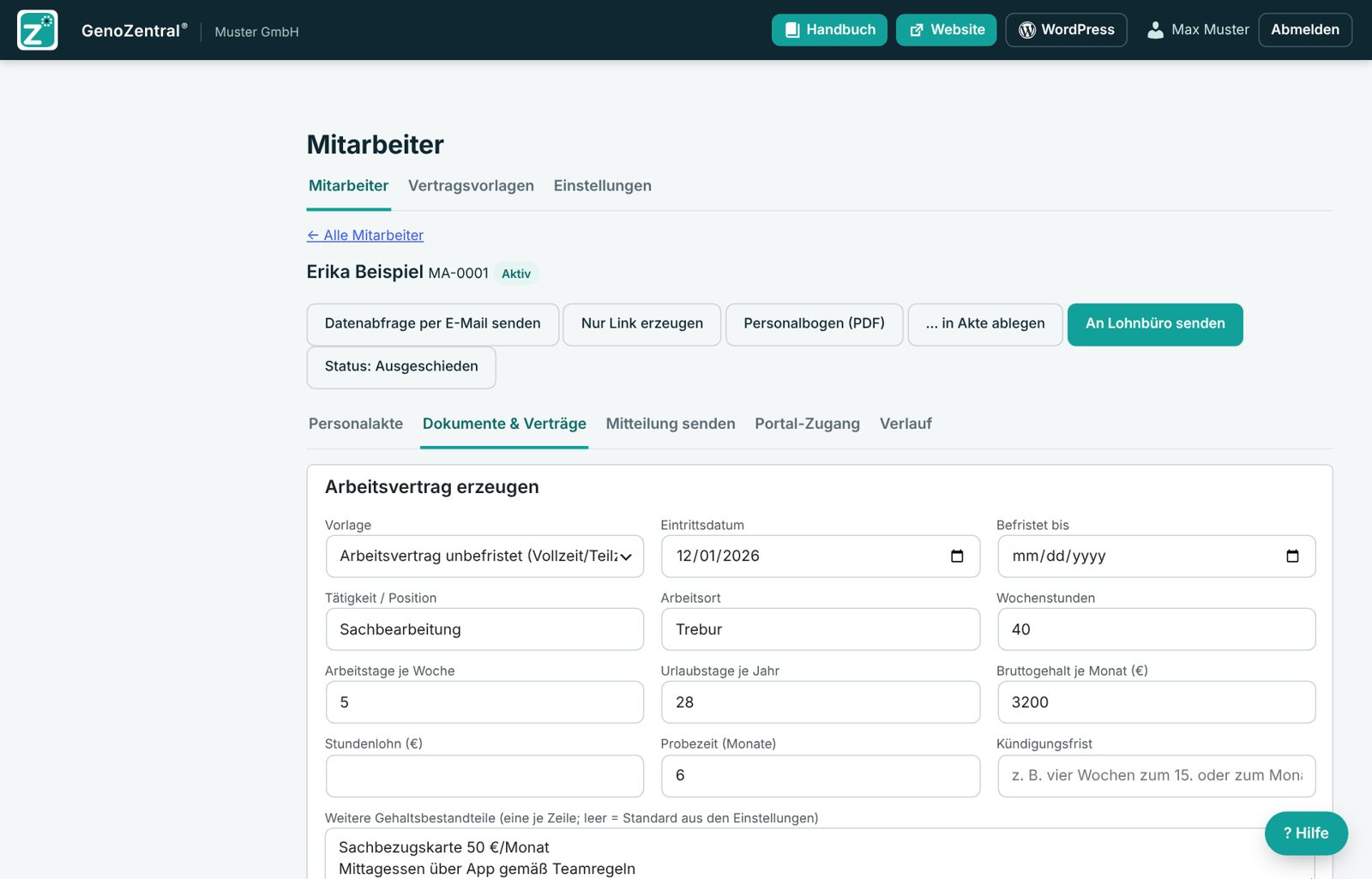
Cooperatives also have employees: Create staff members, have staff sheets filled in by the staff member himself via a fixed-term link, generate employment contracts from customizable templates (permanent, fixed-term, hourly wage, mini-job, working student) and have them signed electronically in the staff portal – with proof PDF, checksums and timestamps. All information is encrypted in the personnel file; the payroll office receives personnel sheets and CSV at the push of a button or automatically.
- Personal documents from templates: Takeover and return protocol Company ownership, obligation to data secrecy, image rights, instruction according to DGUV V1, termination agreement, termination
- Messages with templates (welcome, invitation, birthday, anniversary, warning, warning) as e-mail or letter, circular letter to all employees, birthday automatic
- Company ownership directory per file, employee portal with one-time code login, document download and own upload; Wage office deposited in the committees
Ticket system
Add-on module: Support, Procedures, Mailbox, AI
Show functionsHide functions
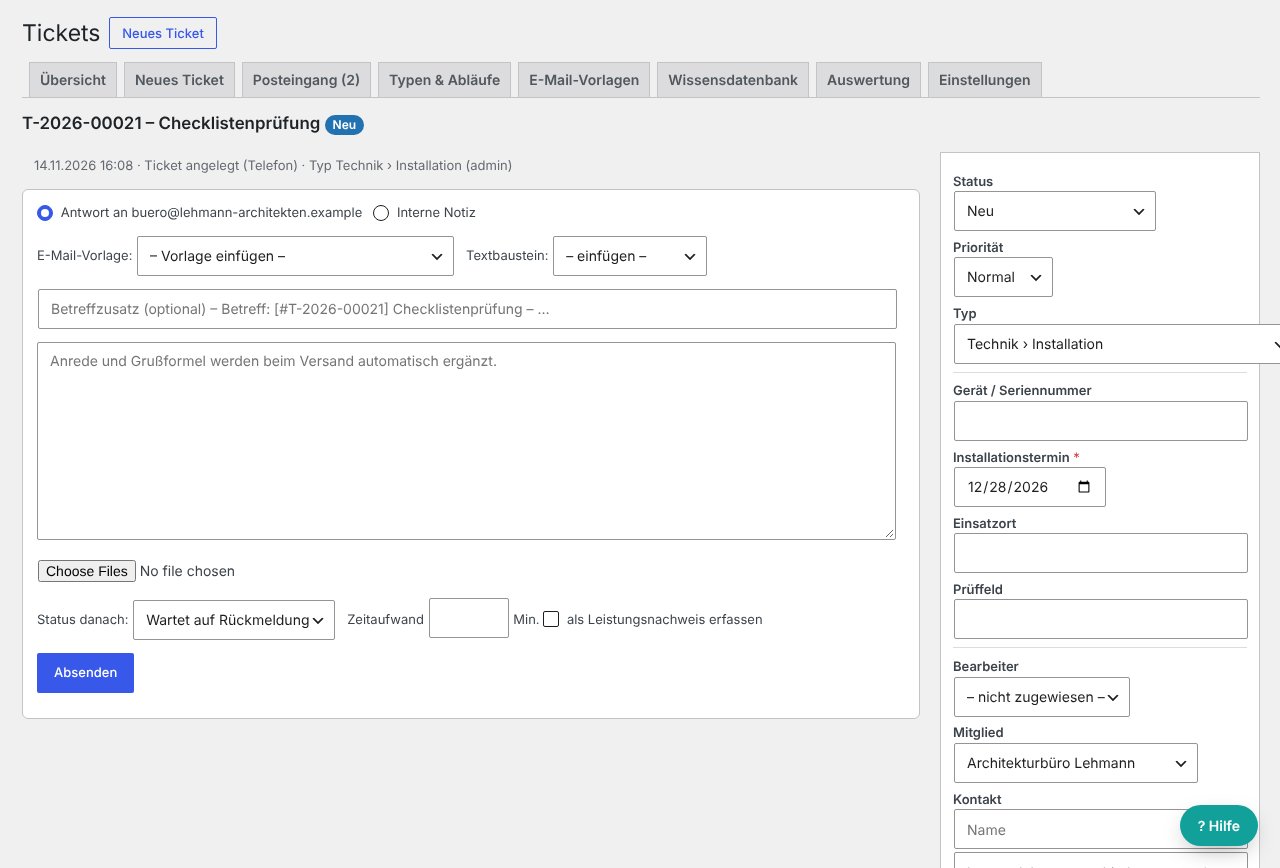
Requests by e-mail, phone, member area or app end up as a ticket with number, priority, SLA deadline and editor. Ticket types with subtypes walk through the process step by step – with checklists, mandatory points and automatic status. The add-on module is activated per license.
- Own ticket inbox (e.g. ticket@...), answers are assigned via the ticket number in the subject, inbox for distribution
- Over 40 email templates, text modules, knowledge base, internal notes, merging and bulk editing
- Actions per step: E-mail, assignment, handover to other department, offer, delivery note or invoice, proof of performance from recorded time
- Processing status for members in the portal, AI response suggestion, evaluation by editor, month, member and process step
Project management
Add-on module: Projects, portal, chat, calculation
Show functionsHide functions
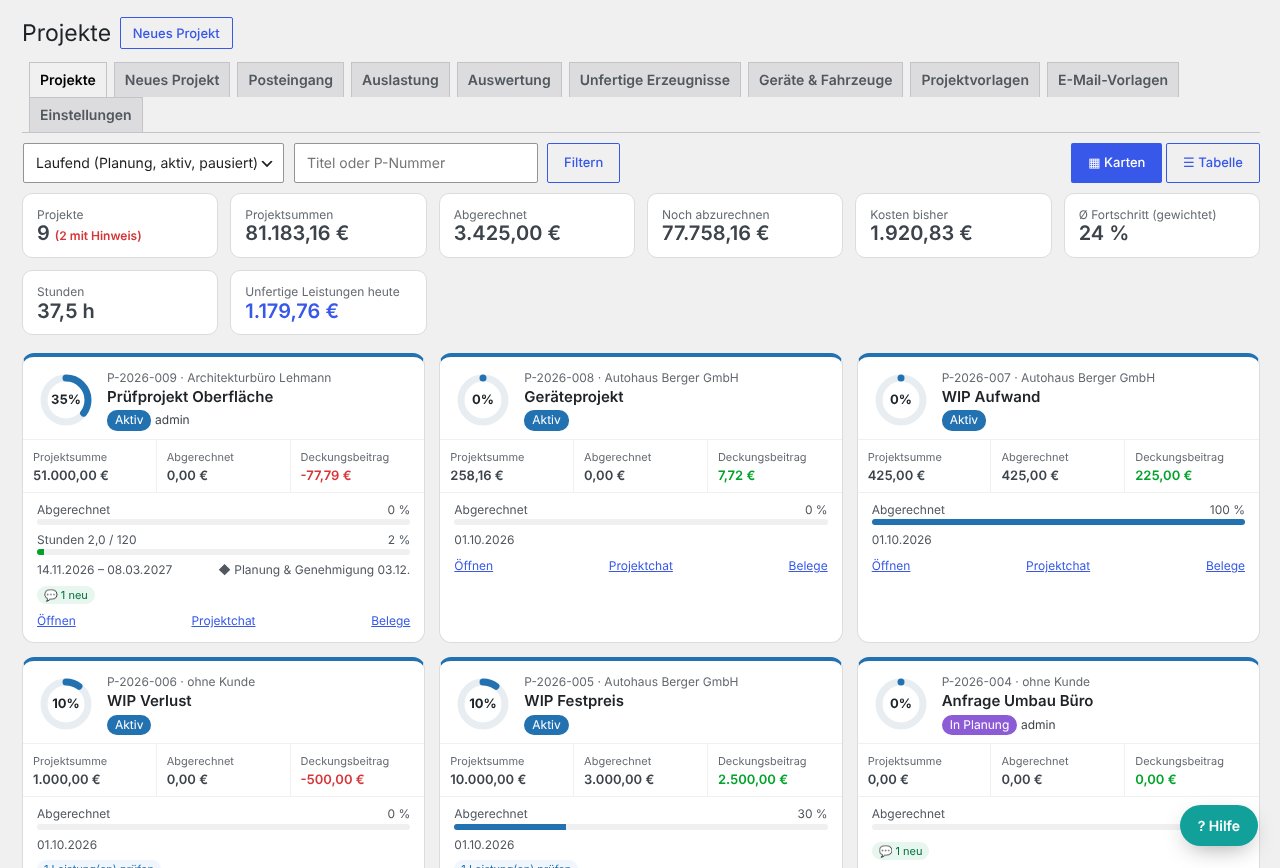
Projects with templates, phases and milestones, task board and Gantt schedule. Members, staff, suppliers and subcontractors work with their own rights in the project portal and in the app – including project chat with photos and files. The add-on module is activated per license.
- Service recording with stopwatch, journeys, expenses with document photo and material, approval by the project management, daily reports/construction diary
- Approvals for offer, plan, addendum and acceptance with signature; Preliminary and final invoice, billing according to expenses
- Post-calculation with contribution margin, project overview with sums and progress, evaluation with CSV export, utilization per person
- Unfinished products at the end of the month for BWA and annual accounts - manufacturing costs, loss-free valuation, accounting proposal, PDF/Excel
- Own project mailbox (e.g. project@...), around 50 email templates, devices & vehicles with cost rates
Dashboard & Automatic
Dashboard, tasks and automation
Show functionsHide functions
The homepage shows new applications, open terminations, open items, monthly invoices due and the association audit at a glance. Resubmissions arise by themselves from the database and remind by e-mail.
- Terminations are automatically executed on the reference date, the repayment of the shares is prepared
- Online vote on draft resolutions in the Members' Area, powers of attorney in the attendance list
- roles for the board, office and reading access for the examination association; Duplicate check and GDPR deletion routine
A surface that convinces.
Board and office work in the own GenoZentral interface: Header with your logo, sidebar with all modules by area, clear forms and tables, nothing distracting. Each page is explained by a guided tour, the manual is always one click away – and anyone who maintains the website switches to the usual management with one click.
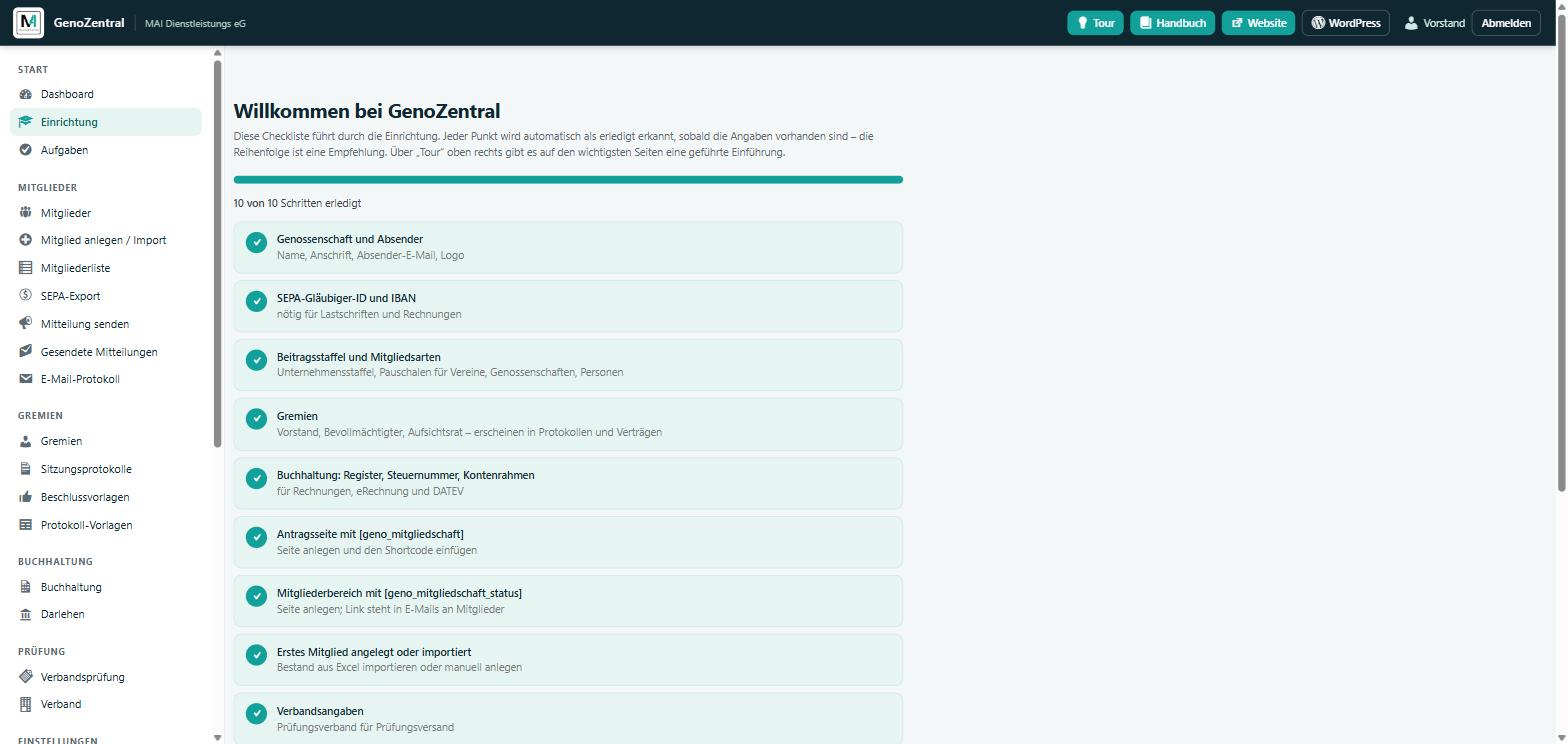
On the main pages, a tour explains step by step what happens where – automatically on the first visit.
The complete manual in the backend; the help widget jumps into the appropriate chapter and sends requests with system report.
All core processes as a BPMN diagram, directly in the tool and as a download for the process documentation.
Further functions in detail
See all 48 other features
Correspondence with templates
Letters to the bank, register court, tax office, authorities, insurance companies and chambers from around 40 templates – in their own letter design, with address book, resubmission, shipping note and QR code: The signed return automatically assigns itself when scanning.
Document mailbox
A separate mailbox such as dokumente@... automatically stores each attachment in the document tray. Documents with QR ID land directly in the correct process, everything else in the inbox - controllable via #folders and #Keyword in the subject.
Locations per customer
Branches and construction sites with address and contact person: can be selected in the offer, delivery note and invoice, as place of performance or as document address ‘z. Hd.’ – also in the invoice.
Recurring invoices
Monthly up to every three years, in advance or subsequently with automatic service period, minimum term, extension, notice period and price adjustment; visible in the portal as ‘Current costs’.
Customer prices, bundles, price maintenance
Customer discount and fixed prices per item, bundles with one click in the receipt, planned price changes with valid-from-date and mass change in percent.
Warehouse and proof of performance
Stock per item with debit via delivery note or invoice, inventory and minimum stock; Collect and settle hours per customer, location and employee.
Unfinished products
Stock of unfinished work per project at the end of the month: Manufacturing costs without profit, loss-free valuation, discounts as down payments, posting proposal for SKR03/SKR04, PDF and Excel for tax advice.
Project chat in the app
Customers, employees, suppliers and subcontractors write in the project as well as in the messenger – with photos of the construction site, files and @ mentions, also by e-mail to projekt@....
Lists, labels and calendars
Telephone, birthday, anniversary and address lists as PDF/CSV, address labels, statistics on the number of members and a monthly calendar with all appointments.
Honours and own data fields
Individual fields in the member file (also in the application form), honors by member year, family membership, different correspondence address and resubmissions.
Inventory and rental
Items with number, location, value and inspection interval, rental to members with return date and history, inspections and segregation.
QR ID on each document
Each generated PDF - declaration of accession, invoice, minutes, decision, contract, certificate - bears a document identifier as QR code. If the signed paper comes back, the document tray recognizes the scan in the browser and automatically saves it as a new version for member, receipt or contract. Labels for foreign documents included.
Signature in the portal
Release contracts and letters for signature or acknowledgement of receipt: The employee receives an e-mail, signs by finger or mouse, the signature is stamped on the PDF and stored in the file with a proof (SHA-256, time, IP).
Audit log and signed updates
Complete, hash chain-secured log of all actions with daily seal, security check with checkpoints, updates only with the manufacturer’s signature, second factor for the app, temporary support access – externally audited in November 2026.
Unique identifiers for interfaces
Each record has a permanent UUID – the stable key for comparison with DATEV, training portals or own evaluations, regardless of member and invoice numbers.
GenoCentral App Now on Google Play
Native app for iOS and Android: Board and accounting check and release receipts, perform tasks, see account balances and member files; Members use the members' area, book offers and answer invitations. Push notifications included, connected to your own installation. More about the app
Document storage with versions
Folders and subfolders with standard storage, multiple upload, versioning (each version immutable with SHA-256), locks for editing, full text search in PDF and Office files, keywords, resubmission with task, archive instead of deletion and ZIP export – the cooperative no longer needs separate file storage.
Contract management
Leasing, telephone, insurance, software: Duration, notice period and automatic renewal per contract, reminder as a task and e-mail before the termination date, letter of termination as a PDF, documents per contract – and, in the case of regular costs, the appropriate permanent document in the accounting department.
Generator for the contribution regulations
The settings for member types, contribution levels, shares and payment methods result in a numbered contribution order with cross-references – as PDF or Word, directly in the document file under ‘Statute & Orders’.
Own e-mail templates with questions
Templates per article or in general, with placeholders and triggers: on booking, on receipt of payment or manually from the membership file. For bookable offers, suitable queries are suggested (set-up, training, hosting, 2FA ...) and sent automatically.
Payment methods and tax rates
Receipt receipts with cash or card payment (without payment history, recognition in account turnover), splitting an invoice to 0 / 7 / 19 % with correct DATEV export per set, own customer number at the supplier – and in the case of SEPA collection, the contribution invoices per member are linked.
DATEV companies online directly Now on Google Play
Document images and invoice data with a posting proposal are sent to the law firm without file exchange - via the DATEV data services, with SmartLogin registration, permanent token and status feedback from documents online. Ready developed and tested, will be unlocked soon; Until then, DATEV export will be available.
Bank connection (FinTS)
Connect the cooperative’s accounts directly: Automatically collect balances and transactions and assign open items, balances on the dashboard - send transfers from the payment process and the SEPA contribution collection directly to the bank, release each submission via TAN, on request as a real-time transfer with recipient verification. Contribution collections, invoice collections, receipt documents and loans are automatically detected in the account turnover – partial payments and collective postings can be assigned manually. Product registration and banking list are included in the plugin.
Entrance receipts in one train
Upload or photograph the document, automatically read it (calculate, PDF, text recognition in the browser, AI), assign the supplier from the root or completely recreate it in the same window; recognition learns from each supplier. Enter the gross amount, choose the tax rate or split it into several rates, mark member support – and release it for payment with one click. A receipt shall not be deemed to have been paid until the debit has been recognized or confirmed in the account turnover. The payment process takes over released documents as a collective or individual posting.
Master data in DATEV format
Export and import customers and suppliers as DATEV “Debtors/Creditors” or CSV. Fixed customer numbers correspond to the DATEV account, members receive their membership number, article numbers are assigned automatically – with contact persons and telephone per record.
Fire protection and comfort
Members cannot be accidentally deleted or moved to the Recycle Bin. To do this: sort and search all tables with a click, upload files everywhere via drag and drop, protection against double entry.
AI Assistant Everywhere
One click on each page: Circular, reminder text, decision text or reply letter from bullet points, quote suggestion, text improve or summarize, questions on operation – with masking of personal data before sending.
Email Settings in Steps
Send or send and receive only, via SMTP/IMAP or Microsoft 365 – with instructions for app registration in Microsoft Entra, shipping test and protocol.
Cash register and cash book
Cash book according to GoBD and § 146 AO: complete numbers, cancellation instead of change, hash chain, document obligation, cash close with counting log and recording, cash report as PDF. Can be switched off if there is no cash flow.
Invoice mailbox and document recognition
Retrieve IMAP or Microsoft 365, create attachments as receipts for examination; eInvoices are read out, other PDFs by document recognition – supplier, number, amounts, due date are already in it.
Release, payment run, fixation
Check and release receipts in the four-eyes principle with amount limit, payment run as SEPA collective transfer with discount, supplier master files, standing receipts, fixed according to DATEV export.
Installations and evaluations
List of fixed assets with linear AFA and fixed assets mirror (can be switched off), totals and balances list, income surplus, VAT figures, tax advisor access with own reading page.
Articles with DATANORM import
Item master files with EAN, product and discount groups, suppliers; Import of DATANORM 4.0/5.0 and CSV with calculation surcharge, search and filter for large catalogs.
Roles and rights
Own roles with ‘no access’, ‘read only’ or ‘write’ per area – e.g. cashier or supervisory board; Read permissions are enforced on the server side.
Remunerate volunteer work
Record hours per member at their own hourly rate, including by the members themselves, and settle them in cycles as shares, contribution credits or payouts.
Subscribing shares
Members apply for further shares in the member area, the board confirms with one click; Collection with the next SEPA run or as already deposited.
Form of Salutation You or You
Centrally adjustable - e-mails, application form and members' area are automatically output in the chosen form.
Loans with partial repayments
Loan agreements between cooperative and member: Enter repayments in parts, interest runs on the remaining debt and can be marked as paid with date, take over old stocks with contract, progress in percent per loan, attach documents per contract.
Payment method per invoice
Direct debit or bank transfer – also selectable with an existing SEPA mandate; Payment text, GiroCode and calculation follow the choice.
Reseller membership
For partners who redistribute your cooperative’s products or services to their own customers – own type of membership with contribution by number of customers and minimum contribution, pre-calculated live in the application; Number of customers can be changed in the file.
Full membership file
Shares, membership number, legal status, tax ID, entry and exit date, own document file – each change is logged, the whole file can be exported as a ZIP.
Legal list of members
Export the list required by § 30 GenG as an Excel file – up-to-date or on a reference date, correctly sorted and with all mandatory information.
Circulars & Member groups
Invitations with acceptance/rejection tracking and notifications – targeted at freely definable groups of members, by type of member and legal status or to the committees. Any email template customizable.
Take over existing members
When switching from Excel or another administration, import all members – a completed template is sufficient.
Association & E-mail signature
Enter your exam association’s name, logo and contact details once – and place them in each email signature with a placeholder as a ready-made block.
Continuous further development
The plugin grows with the requirements of practice: New functions come directly from the everyday life of our cooperative and the feedback of the members. Updates appear as usual in WordPress under Updates – with changelog and one-click update.
AI connection
Optional and only on request: With your own API key, the AI creates the text of a resolution template from a few key points. Anthropic Claude is preset, OpenAI-compatible services can also be connected – member data is never transferred.
Excel and DATEV exports
notifications, draft resolutions, minutes and the legal list of members as an Excel file; Documents as CSV, DATEV booking stack and annual export for tax advice.
Each process is documented – as a BPMN diagram.
Who does what, what happens automatically, where is decided: GenoZentral provides ready-made process diagrams for its ten core processes – inclusion, contribution collection, termination, billing and dunning, association audit, service booking, meeting and decision, share transfer, loans and support access. They facilitate the induction of new board members, belong to the procedural documentation and answer questions from the examination association. For example, the admission of a member:
Circle = start/end · Rectangle = task (white: Person, green: automatic by GenoZentral, blue: Message) · diamond = decision · dashed = message flow. All diagrams are available in the backend under ‘Processes’ and can be downloaded as SVG or shortcoded on own pages.
Who wants to know exactly.
Everything contained in the GenoZentral – without hidden modules.
| Digital application for admission for companies, associations, cooperatives, natural persons and resellers – legally secure since the 2025 GenG amendment, with declaration of participation, number of shares and all information according to the articles of association | Included |
| Natural persons with date of birth and tax ID, choice between ordinary and investing membership; Existing members with already paid-in shares | Included |
| Voluntary work: Hours with individual hourly rate, notification in the member area, settlement as shares, contribution credit or payment | Included |
| Shares: subscribe for further shares (application in the member area, confirmation by the Executive Board), mark existing shares as paid-in | Included |
| Contribution scale according to employees or lump sums, temporary reductions, contribution adjustment with advance | Included |
| Membership file with shares, membership number, legal status, date of entry and exit | Included |
| Document storage per member, change log, complete file export as ZIP | Included |
| Declaration of accession/participation according to §§ 14, 15a, 15b GenG automatically generated | Included |
| Excel import with template, duplicate check, member groups | Included |
| Legal list of members according to § 30 GenG as Excel – current or as of the reference date | Included |
| GDPR anonymisation of retired members by retention period | Included |
| Registration via e-mail link, without password | Included |
| Change master data and bank details yourself, cancel with deadline calculation, request articles of association | Included |
| Retrieve supporting documents, invoices and membership declaration as PDF | Included |
| Book Services Directly - Invoice Immediately by Email | Included |
| Online vote on draft resolutions | Included |
| Installable as an app on mobile phone and tablet, mobile optimized | Included |
| SEPA direct debit mandate with PDF, optionally with digital signature in the application | Included |
| Prepayment notice, SEPA-XML (pain.008) with first and subsequent direct debit, suspend collection | Included |
| Share of business automatically with the first move-in | Included |
| Contribution invoices for each member automatically with each collection | Included |
| Board of Management, representative of the GV, Supervisory Board, tax consultant with organizational chart | Included |
| bodies directly selectable from the members; Member selection takes over name and e-mail | Included |
| Minutes of meetings with templates, attendance list, power of attorney and PDF | Included |
| Decision templates with AI support and online voting | Included |
| Invitations with acceptance/rejection tracking and Excel export | Included |
| Circulars by status, group of members, type of member, legal status or to committees | Included |
| Email templates with placeholders, HTML layout with logo and signature | Included |
| Email protocol with delivery status, own SMTP dispatch | Included |
| Each check as a separate process with checklist according to association template and progress | Included |
| Directly fill in uploads per point, justifications for inaccurate documents, association forms | Included |
| Year-end member lists, ZIP in the folder structure of the association, dispatch by preview | Included |
| Reading access for the examination association | Included |
| Offers, order confirmations, delivery notes, invoices, credit notes | Included |
| calculation as ZUGFeRD (PDF/A-3) and XRechnung, GiroCode for scanning | Included |
| Receipt designer with three layouts, logo, colors, footer and text modules | Included |
| Item master files with purchase and sale price, customer master files, customers from members | Included |
| Monthly invoices automatically, incoming payments via account statement import, dunning | Included |
| Reverse charge with VAT number check, receipts, member promotion with evaluation | Included |
| DATEV booking stack, GoBD archive, annual export, sales and article evaluation | Included |
| Payment method per invoice selectable (direct debit/bank transfer), two payment texts, salutation personalized, address only company | Included |
| Loans with partial repayments, residual debt and interest per section | Included |
| Dashboard with all open points, tasks with email reminder | Included |
| Roles for board, office and auditor | Included |
| Automatic execution of confirmed terminations | Included |
| Personal data encrypted in your own WordPress database – no cloud provider | Included |
| Process diagrams (BPMN) for ten core processes – in the backend, as SVG download and by shortcode | Included |
| Own management interface with sidebar, setup wizard and guided tours - WordPress remains accessible for administrators | Included |
| Backup & Security: encrypted backups of settings and data with own key, import also on other server, daily automatic; External target (WebDAV/S3/SFTP) | Included |
| unlock lock after login (shared or personal key, by roles, users and areas), brute force protection and session timeout; Security check with 15 checkpoints | Included |
| Blind copy of all documents sent to accounting or DATEV | Included |
| Cash book according to GoBD (cash): Cancellation instead of change, hash chain, cash close with counting log, fixed – can be switched off | Included |
| Invoice mailbox (IMAP / Microsoft 365) with automatic creation of incoming receipts; Receipt recognition for eInvoices and PDF invoices (optional AI) | Included |
| Supplier master files, release workflow (four-eyes, amount limit), cancellation and setting of incoming documents, payment run pain.001 with discount, permanent documents | Included |
| List of installations with AFA and system mirror (can be switched off); Total/balance list, revenue surplus, VAT figures; Tax consultant role with reading page | Included |
| Item management with EAN, goods/discount groups, DATANORM/CSV import and export | Included |
| Own roles with area rights (no access / read/write only); E-mailing via Microsoft 365 | Included |
| DATEV companies online: Document image service and invoice data service 1.0 (booking suggestions), SmartLogin, permanent token, status query with protocol | in activation |
| AI assistant on all pages with quick actions per area; AI connection centrally in settings, masking of personal data | Included |
| Article: Supplier from the supplier master files, goods and discount groups as master data; Attachment list and cash register can be hidden | Included |
| Manual in the backend, help widget with system report and ticket to the operator | Included |
| Form of address You/you centrally for e-mails, application and member area | Included |
| Process documentation according to GoBD at the push of a button – Chapters from the plugin, company data, users, number ranges and system status automatically inserted, PDF with version history | Included |
| Manual directly in the backend, activation and updates after onboarding via the MAI eG | Included |
What comes next.
GenoZentral grows with the needs of our members. These extensions are planned – the order determines the wishes of the cooperatives. Are you missing something? Write to us.
GenoZentral App - now on Google Play
The app for board members and members is published on the Google Play Store; The iPhone version is coming soon to the App Store. Load on Google Play · To the app page
DATEV company online - in activation
The direct connection to DATEV companies online is fully developed and tested. As soon as DATEV has completed the last audit, we will unlock it for all cooperatives with booked onboarding – without any action on your part.
Small business regulation (§ 19 UStG)
Documents without VAT with mandatory notice, no VAT, monitoring of turnover limits and change to standard taxation at the reference date – first for FirmaZentral.
Booking data service (DATEV)
Completed posting records in DATEV format directly to the data center instead of as a file – second expansion stage of the DATEV connection, subscribed and prepared.
Dividend and Remuneration
Billing according to GenG with tax certificate, as credit or offset with the contribution.
Push notifications
Invitations, votes and invoices as a message on mobile – via the web app.
Add-on Housing Cooperative
Lease agreements, handover protocols, utility billing and tenant communication – integrated in the member file.
Management as a database
Customers, articles, subscriptions and receipts in own data structures for very large cooperatives.
VereinZentral – the variant for clubs
Members and types of members with family contribution, board and general meeting in accordance with the German Civil Code (BGB), donation receipts – the same platform, adapted to the law of the association. More about VereinZentral
FirmaZentral – the variant for small businesses
Customer files and portal, accounting with invoice, invoice mailbox, payment history, cash register, documents, contracts, shareholders’ meeting and own app – without member management, on the same platform. To firmazentral.de
As of November 2026. Planned functions are not a binding performance promise; They will be delivered with updates as soon as they are finished.
What Cooperatives Want to Know Before Starting
What do I need to use the plugin?
Does the plugin work with my theme and page builder?
Are you taking over the installation?
How do updates get to me?
What happens to the data when I cancel?
Manage your cooperative completely in WordPress?
We show you the plugin on your use case and set up a temporary test license. If you wish, we can install your existing WordPress installation for a surcharge – or create a complete website with WordPress and a ready-made plugin.
MAY Services eG · info@mai-eg.de · terms. GenoZentral®, VereinZentral® and FirmaZentral® are registered trademarks of MAI Dienstleistungs eG.